LINE SCREENS
Live line and station screens
Plant home, line and station views with a navigation tree, tabs and Ctrl+K search to jump anywhere. Status, setpoints and the PLC's own limits on every station.

A modern operator interface for your line that runs in any browser, on any device: live line screens, OEE, alarm management and maintenance tickets, with every event tied together on one timeline. Start with one line, grow to the whole plant: the AIS HMI becomes your SCADA, without starting over or buying a second platform.
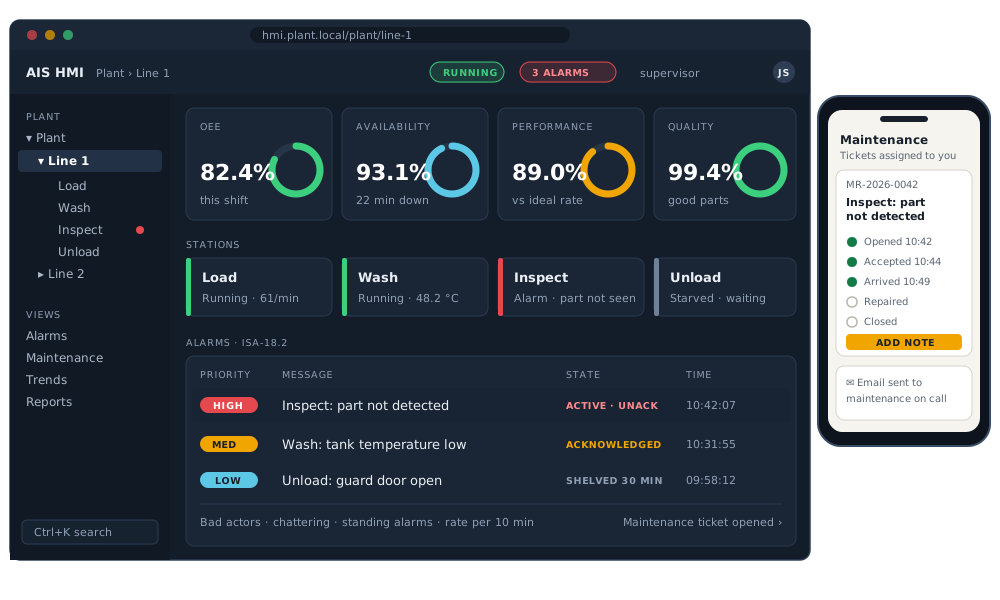
Illustration with example data.
Built and tested against the machine's own PLC program running in a full simulation, so it works with your line before it's installed on it.
Plant home, line and station views with a navigation tree, tabs and Ctrl+K search to jump anywhere. Status, setpoints and the PLC's own limits on every station.
Availability, performance and quality, with one agreed definition of “running”, plus output and pace against plan on the plant home page.
Priorities, alarm states, acknowledge with a comment, shelving, and the analysis that cuts alarm floods: bad actors, chattering and standing alarms, and alarm rate per 10 minutes. Annunciation banner and sound.
Chosen alarm groups automatically open a maintenance request. Every event is tied together on one timeline: alarm, acknowledgement, accepted, arrived, repaired, back in production, closed. Downtime is counted against the real cause.
A separate app for the maintenance team that works on a phone, a tablet or a desk monitor: accept tickets, keep a notes log, print a work order.
An address book and an “email to” list per alarm group. Messages go out when a ticket opens, is accepted, isn't accepted in time, or closes, and for critical alarms.
Trends over selectable windows, a report for every batch against its limits, CSV export, and recipe timing.
Viewer, operator, supervisor, maintenance, engineering and administrator. The server checks the role on every action, not just the screen.
A runtime Engine and a Designer share one project format, the way a GOT runs its runtime and GT Designer builds the project. The Designer opens the project, checks it against the Engine's own rules and runs it with live values. Screens drawn by hand and screens drafted with AI follow the same rules and land in the same files.
A project names its data sources, and several can run at once. With the AIS Edge bridge, every device AIS Edge connects becomes a source of tags for the screens, from MELSEC and OMRON to EtherCAT® drives and CC-Link IE stations (those two in testing in AIS Edge, in simulation).
| Source or platform | What it does | Proven so far |
|---|---|---|
| AIS Edge bridge | The Edge's own tag names, a live event stream, writes through the Edge (refused while the link is down, never queued), link state per PLC. The Designer imports tags, screens and texts from AIS Edge. | Verified against a real AIS Edge runtime |
| MELSEC SLMP | The Engine's own MC protocol 3E client: read, subscribe and write, with a write allow-list | Interop AIS SoftPLC; a real iQ-R next |
| Modbus TCP | Client for any Modbus TCP device | Supported simulator |
| Industrial PC service | Ubuntu LTS, a systemd service with watchdog and automatic restart; a locked-down kiosk browser on the panel itself | In testing |
| Signed updates | Signed packages, a trial run with automatic fallback, deliberate rollback, never an accidental downgrade | In testing signatures checked against the standard's test vectors |
| 30-day burn-in | A month-long run with faults injected on purpose, started 22 October 2026 | In validation running |
Honest about the link: when a PLC link drops, every value shows "no data" at once, writes are refused and PLC-bit alarms freeze rather than clear falsely, and a system alarm says why. EtherCAT® is a registered trademark and patented technology, licensed by Beckhoff Automation GmbH, Germany.
The AIS HMI is built to grow into SCADA itself: more lines, more screens, more users, the same alarms, OEE and maintenance across the plant. There's no point where you have to move to something else.
And if your company has standardized on another platform, you're not locked in. The screens are defined once, and the same definition builds Ignition screens today, with ICONICS GENESIS64 and Mitsubishi GOT paths prepared.
Each Engine version is pinned by the projects tested with it, and the automated tests and a regression run of the first customer project pass before every release.
In use on a first customer project, running against that line's simulation, or verified against a real counterpart.
Built and passing on the demo project and in automated tests; not yet in a plant.
Next on the list.
We can demonstrate the AIS HMI live, driven by a simulated line. Tell us about your line and we'll show you what it would look like on yours.