
We build our own tools, so your project doesn't wait on ours.
Over the years AIS has built a set of in-house engineering tools that let us read, check, convert and write controller projects quickly and repeatably. They are why we can decode an undocumented machine in days instead of weeks, and why the changes we hand over are consistent.
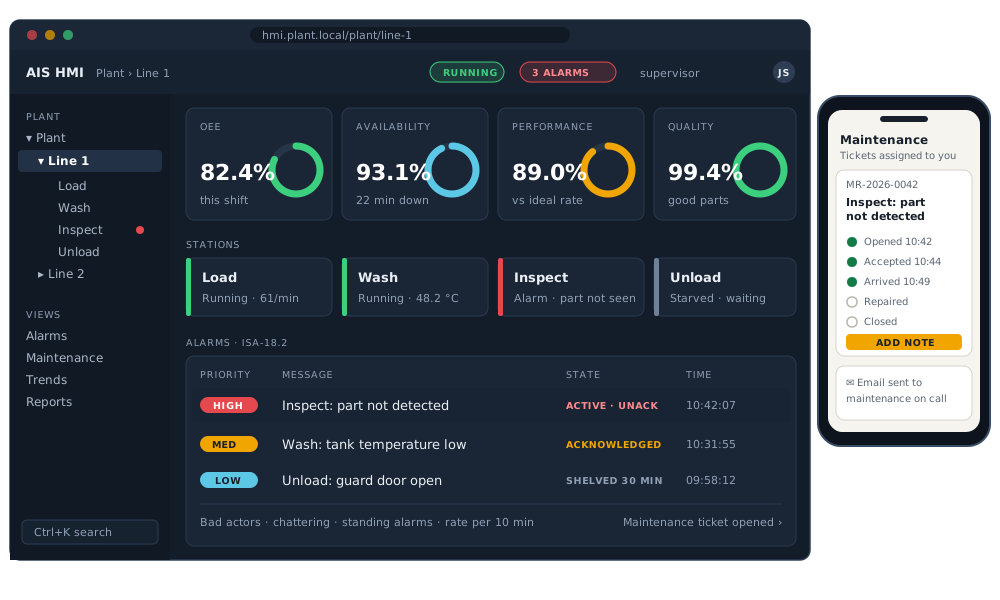
AIS HMI: an HMI that grows into SCADA.
Live line screens, OEE, ISA-18.2 alarm management and maintenance tickets, in any browser, on any device. Alarms open tickets, the maintenance app works on a phone, and the right people get an email. A Designer builds the screens, ladder and sequence monitors show the PLC live, and every device AIS Edge connects can feed it. It grows with you, from one line to the whole plant, and becomes your SCADA. No second platform to buy.
Working tools, built in-house.
Program conversion Working
Move a program to a different platform or a different language without retyping it. We have converted Sharp JW programs to Mitsubishi MELSEC, and convert Mitsubishi programs between languages: ladder to Structured Text, and SFC to Structured Text. The converted program is simulated against the original's behaviour, then compiled and checked in the target platform's own software.
Mitsubishi project tools Working
Read, document and generate content for GX Works2, GX Works3 and MT Developer2 projects and data logger configurations: programs, labels, comments, motion SFC charts and capture setups. Everything they write is then opened, compiled and saved in Mitsubishi's own software.
ICONICS-to-Ignition converter Working
Converts GENESIS64 displays, tags, alarms and trends to Ignition Perspective, with a per-element report of what converted and what needs a person. On a 125-display test project, 97% of elements converted automatically.
Machine simulators Working
We build simulators of the machines we work on, so we can test our code before it reaches the machine. The real program runs against a model of the machine, and scripted scenarios check every step, including faults injected on purpose.
Manual Explorer Working
A searchable library over more than 1,600 Mitsubishi e-Manuals, so every technical answer we give can cite the page it came from.
Products in development.
Some of what we built for our own work turned out to be what plants keep asking for. These are being developed into AIS products. Interested in a pilot? Tell us about your plant.
AIS Edge Device: connect every machine, keep every record Developing
Our edge runtime and engineering studio. It reads Mitsubishi and the other PLC families on the floor, any OPC server and the devices around them, runs production logic as flowcharts, and delivers every record to databases, brokers, MES, ERP and historians, through outages. It works hand in hand with our AIS HMI.
- Native clients written from the published standards: 90+ device protocols, OPC UA and DA, seven databases, MQTT, Kafka, AMQP, NATS, JMS, AWS and Azure, Ethernet TSN and more
- An EtherCAT® master and CC-Link IE stations in software, in testing in simulation; AIS is a member of the EtherCAT Technology Group (ETG) and the CC-Link Partner Association (CLPA)
- On the device: an FTP / FTPS server, network settings that revert if they lock you out, signed updates with rollback, Python scripting and an encrypted local SQL database
- Tags taken by label name straight from GX Works2 and GX Works3 projects, so nobody retypes an address list
- Store-and-forward on every output: in our tests, outages and power cuts lose no records
- One tag model and screen format shared with AIS HMI, so edge dashboards grow into full HMI and SCADA screens
- Linux or Windows industrial PCs; Studio, messages and dashboards in English and Japanese
AIS SoftPLC Developing
A PLC in software. It runs a real controller program on a PC, wired to a machine simulator, and answers the network like the real CPU, so we can test code, screens and data collection without the machine. So far it simulates a Mitsubishi MELSEC iQ-R R08CPU and a Sharp PLC; all five IEC 61131-3 languages are in development.
AIS OPC Explorer Developing
An OPC diagnostics and repair tool. It finds every OPC Classic and OPC UA server on a PC or across the network, shows why a connection is failing, and helps fix it. Fully portable: no installer, runs from a USB stick.
Real hardware, on the bench.
Before anything goes to a client's machine, it runs here. The AIS lab has current Mitsubishi hardware networked the way plants are, and a set of industrial and small-form-factor PCs that act as edge devices, test stations and simulated plants.
Controllers
- MELSEC iQ-R CPU with CC-Link IE Field
- iQ-R MES interface module
- MELSEC iQ-F (FX5)
- FREQROL E800 inverter
Computing
- Advantech industrial PC, real-time Linux, TSN-capable NICs
- Lab control station with GX Works3, TAKEBISHI DeviceXPlorer and Ignition
- Tool-work and demo PCs
- Virtual machines for every MELSOFT generation
When a tool writes a program change, it writes the same change the same way every time, and it can show exactly what changed. Only the parts that need to change are touched, and the result is compiled clean before it leaves the bench.